Audit Policy Settings
Why logon auditing is needed
Enable Success and Failure auditing for Audit Logon on the Windows Server running RdpGuard. You can use Local Security Policy or the auditpol command-line tool.
RdpGuard uses failed logon events from the Windows Security log for RDP detection and RD Web Access detection.
Successful logon events allow RdpGuard to reset failed-attempt counters after a successful Windows logon and trigger successful logon notifications.
Configure auditing on the server you want to protect. Administrator permissions are required for the steps below.
Configure auditing with Local Security Policy
Press Windows + R, enter
secpol.msc, and click OK.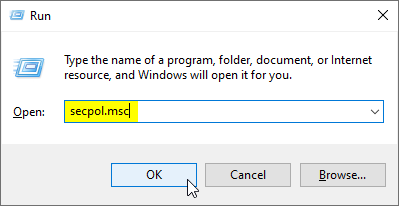
Open Local Security Policy with secpol.msc. In Local Security Policy, go to Security Settings, Advanced Audit Policy Configuration, System Audit Policies - Local Group Policy Object, Logon/Logoff.
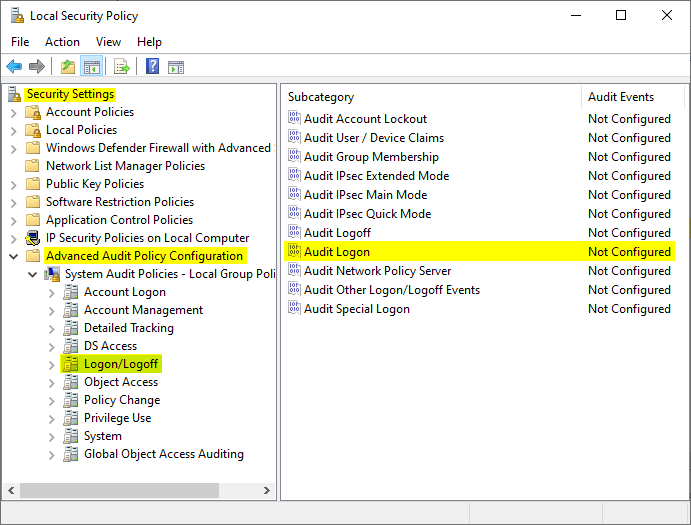
Select Logon/Logoff to find the Audit Logon policy. In the right pane, double-click Audit Logon. The Audit Logon Properties dialog will open:
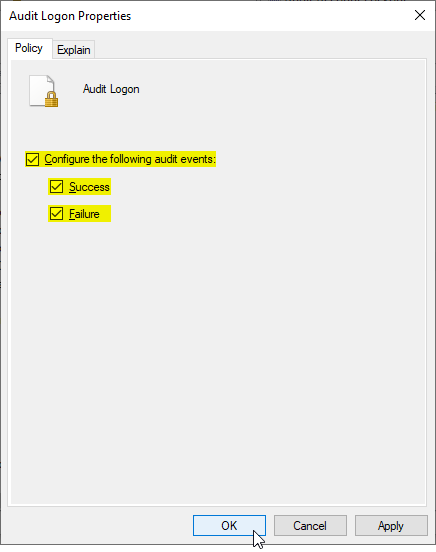
Enable Success and Failure auditing for Audit Logon. Select Configure the following audit events, then select both Success and Failure. Click OK to save the policy.
The Audit Events column should show Success and Failure for Audit Logon. Use the verification command below to check the effective policy.
Configure and verify auditing with auditpol
Open Command Prompt as Administrator.
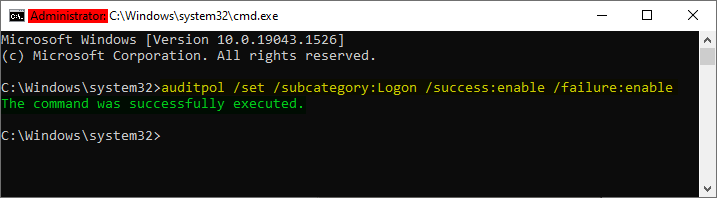
Run this command to enable auditing of successful and failed logons:
auditpol /set /subcategory:"Logon" /success:enable /failure:enableA successful update displays:
The command was successfully executed.Verify the effective policy with:
auditpol /get /subcategory:"Logon"The Logon row should show Success and Failure.
Verify that Logon auditing includes Success and Failure.
On a non-English Windows installation, the subcategory name may be different. You can use the Logon subcategory GUID in either command:
/subcategory:"{0CCE9215-69AE-11D9-BED3-505054503030}"If Group Policy manages auditing on this server, configure the setting in the applicable Group Policy Object. Group Policy can overwrite local auditpol changes.
RdpGuard protects:
- Remote Desktop
- MS-SQL Server
- FTP Protocol
- HTTP Protocol
- IMAP Protocol
- POP3 Protocol
- SMTP Protocol
- IIS Web Login
- MySQL Server
- ASP.NET Forms
- RD Web Access
- VoIP (SIP Protocol)
- SSH Protocol
- MS VPN (RRAS)
"This sotware is really great. It's a relief. Because my server is constantly under attack. Thanks RdpGuard" - Joaquim De Sousa Marques
"Nice product. I used to implement something similiar in a low-tech and cumbersome manner via a script called TSBlock (not mine). This makes it much easier and is well worth the pricetag for SMB's." - J. Johnson
"Absolutely amazed at your product. We are a church in the North Dallas area, and I discovered this morning multiple failed logon attempts via our Remote Access Server. A friend suggested your product, so I immediately downloaded the trial. It had a list of about five blocked IP addresses in minutes, and that was enough to lead me to push the BUY button. Over the past 10-15 minutes the list is now about thirty with at least a third being international attempts to break into our system. Thanks for a great product. You may have just saved us much grief." - John Hallford
"Love the software. RDP on our Windows servers is just ridiculous. We would block it in the router but we have lots of old-time customers that would have issues." - Scott Hirsch
"Love the software! Makes it easier than tailoring VB Scripts!!" - Nick Brennan
"It's a great product - really stopping those RDP attackers :-)" - Dave, UK
"First of all: Your application is very (!!!) useful and I like it very much securing my 2012 R2 server. RdpGuard is the best solution, I found on the market and after 10 minutes of testing it I ordered the fully-featured version. :-)" - Carsten Baltes