Microsoft VPN (RRAS) Protection Settings
Protection Overview
RdpGuard's Microsoft VPN (RRAS) protection monitors failed VPN authentication and IPsec negotiation events in Windows event logs. It blocks a source IP address when detections reach the configured limit. The module watches these two event sources:
- System log, RemoteAccess, Event ID 20271 - failed RRAS authentication attempts.
- Security log, Event ID 4652 - failed IPsec Main Mode negotiations. Events recognized as Negotiation timed out are ignored automatically.
In Event Viewer, Windows Logs, check the System and Security logs for new events from your VPN server. Each supported event must contain a valid remote IP address. For event 4652, enable Failure auditing for Audit IPsec Main Mode under Advanced Audit Policy Configuration, Logon/Logoff in the policy applied to the server. See Microsoft's IPsec Main Mode audit documentation.
How to Enable and Configure MS VPN Protection
Run RdpGuard Dashboard as administrator. Under Monitored protocols, click MS-VPN to open its settings. This protection is disabled by default.
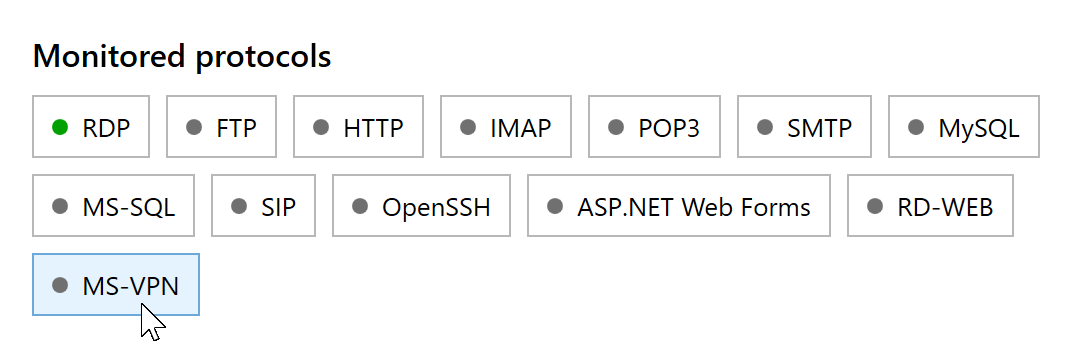
Click MS-VPN to open its protection settings. Select Enable MS VPN protection and click Save. RdpGuard saves the settings and restarts its service automatically.
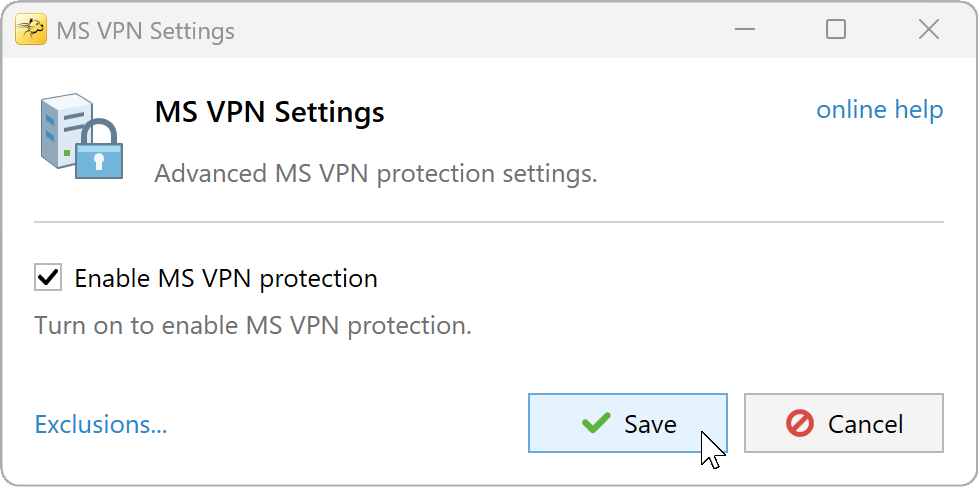
Enable MS VPN protection and click Save.


To adjust the failed-login limit or block duration, open Tools, Options, General. The whitelist also applies. By default, blocked addresses lose access to all server ports. If you use blocking for selected ports, make sure your rules cover the VPN traffic you intend to block.
If an address is not detected, check for new 20271 or 4652 events and inspect their remote IP address and failure reason. If it is detected but not blocked, check the configured limit, whitelist and exclusion rules. Monitoring errors and messages about excluded events appear under View, Show event log in RdpGuard Dashboard.
Exclusion Rules
Exclusion rules skip matching VPN events before RdpGuard counts them toward blocking. Use them for specific, understood failures that should not trigger a block. In MS VPN Settings, select Enable MS VPN protection and click Exclusions.... Enter your rules, click OK, then click Save in the settings dialog to apply them.

Rule syntax
- Write one rule per line. A match against any line skips the event (OR).
- Separate conditions with commas. All conditions on the same line must match (AND).
- Use
=to match a value or!=to match a different value. The field must exist in the event for either operator. - The wildcard
*matches any sequence of characters.
For example, these rules exclude a particular user/IP combination in RemoteAccess events, or an IPsec policy mismatch from the same address:
IpAddress=203.0.113.25,TargetUserName=vpn-user
RemoteAddress=203.0.113.25,FailureReasonShort=PolicyMatchError
The first line applies to event 20271; the second applies to event 4652. Replace the example address and values with those from events you have reviewed. Other failures from that address remain eligible for detection unless they match another exclusion or the address is whitelisted.
Keep exclusions narrow. An attacker can attempt a known username, so a rule matching only that name also skips an attack using it. Likewise, a broad rule such as FailureReason=*password combination* would skip common bad-password events from any source. Combine relevant conditions on the same line when you need a restriction.
EventData Fields Available for Rules
Event ID 20271, RemoteAccess
Windows records this event's data as positional values. RdpGuard adds the following names for use in exclusion rules; these aliases do not appear in the original event XML. A field is available only when its source value is present and nonempty.
ConnectionIdorSessionId- connection/session identifier.User- the user value recorded by Windows, such asdomain\vpn-user.TargetDomainName- the domain from adomain\uservalue.TargetUserName- the username after the backslash, or the full user value when no domain prefix is present. Auser@example.netvalue remains intact.IpAddressorIPString- remote IP address.FailureReasonorReason- authentication failure reason text.ErrorCode- error code recorded by Windows.Binary- binary payload value, when present.
Event ID 4652, IPsec
For this event, RdpGuard uses the named fields from the Windows event XML. Useful fields include:
RemoteAddress- remote IP address; use this field in IPsec exclusions.LocalAddress- local endpoint IP address.RemoteMMPrincipalName- remote principal recorded for the Main Mode negotiation, when available.FailureReason- the failure reason recorded by Windows.FailureReasonShort- a normalized reason added by RdpGuard, such asPolicyMatchErrororIKEAuthCredentialsUnacceptable. Unrecognized reasons useUnknown.
To check the original names and values, open the event in Event Viewer, select Details, then XML View, and inspect its EventData elements. The additional FailureReasonShort field exists only inside RdpGuard. Use the field names for the event you are targeting: the IpAddress alias from event 20271 is not added to event 4652.
RdpGuard protects:
- Remote Desktop
- MS-SQL Server
- FTP Protocol
- HTTP Protocol
- IMAP Protocol
- POP3 Protocol
- SMTP Protocol
- IIS Web Login
- MySQL Server
- ASP.NET Forms
- RD Web Access
- VoIP (SIP Protocol)
- SSH Protocol
- MS VPN (RRAS)
"This sotware is really great. It's a relief. Because my server is constantly under attack. Thanks RdpGuard" - Joaquim De Sousa Marques
"Nice product. I used to implement something similiar in a low-tech and cumbersome manner via a script called TSBlock (not mine). This makes it much easier and is well worth the pricetag for SMB's." - J. Johnson
"Absolutely amazed at your product. We are a church in the North Dallas area, and I discovered this morning multiple failed logon attempts via our Remote Access Server. A friend suggested your product, so I immediately downloaded the trial. It had a list of about five blocked IP addresses in minutes, and that was enough to lead me to push the BUY button. Over the past 10-15 minutes the list is now about thirty with at least a third being international attempts to break into our system. Thanks for a great product. You may have just saved us much grief." - John Hallford
"Love the software. RDP on our Windows servers is just ridiculous. We would block it in the router but we have lots of old-time customers that would have issues." - Scott Hirsch
"Love the software! Makes it easier than tailoring VB Scripts!!" - Nick Brennan
"It's a great product - really stopping those RDP attackers :-)" - Dave, UK
"First of all: Your application is very (!!!) useful and I like it very much securing my 2012 R2 server. RdpGuard is the best solution, I found on the market and after 10 minutes of testing it I ordered the fully-featured version. :-)" - Carsten Baltes